
Gamopelis: My distributed, self-hosted movie system built with Jellyfin and remote FFmpeg


Today we are talking about Gamopelis, one of the personal services I run in my cluster which works as a self-hosted Media Streaming Service (like Netflix), along the optimizations I had to do to accomplish my limited resources.
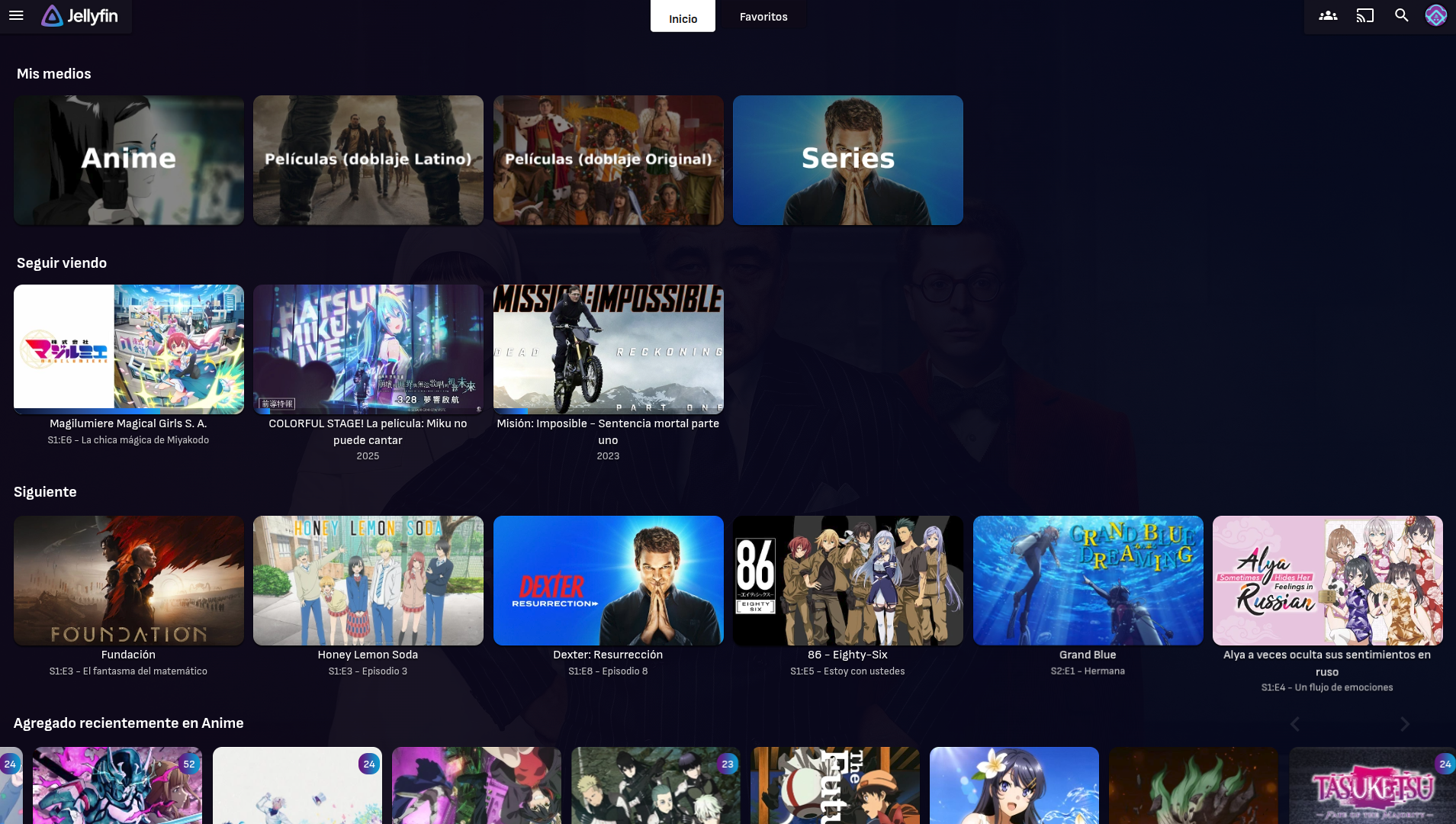
Under the hood, Gamopelis is Jellyfin with a few patches on top and distributed video transcoding on demand, more on this later 😄
What is Jellyfin?
Jellyfin is a "simple" software that allows you to stream videos from your server to any device, even over internet. It's mainly known for being able to stream movies and series (in my case, I do Anime!) but I've learnt recently it can also stream Live TV, Books and even Music! O_o
But, why?
Good engineering starts with a 'why', and this project is no exception 😉, when I was a kid, I used to download movies from straight up Youtube with my Windows 7 computer and load them into a usb pendrive so I could connect and watch it on my TV with my family ("Smart TV" was not a thing 12 years ago at my home!). Jellyfin has been around since 2018, but it was not the first media server to exist.
The first media service, "DLNA", exists since 2004. it's the same in concept as Jellyfin (play videos stored on a server from your personal device) and it's integrated into almost all TVs launched in 2009 or newer.
Plex, another media service, is around since 2010~, Emby originally exists since 2009 (it was known as simply "media browser") but was renamed to "Emby" in 2015. (Source).
Knowing all the other options, why specifically Jellyfin, which is newer than the battle-tested Plex or Emby?
Jellyfin over Emby
Emby is a media server that was an alternative to the known Plex ecosystem. According to wikipedia,
As of version 3.5.3 Emby has been relicensed and is now closed-source, while open source components will be moved to plugins.[6] Due to this, a free open source fork of Emby was created called Jellyfin.[7]
Jellyfin was launched around 2018, right after Emby went closed source. Since 2021, Emby now requires a subscription to watch movies on non-compatible devices and locks a few features behind a paywall.
The problem is not that Emby went closed-source, locking features behind a paywall makes me avoid the software completely.
Jellyfin over Plex
Plex is a self-hosted media service that exists since 2008. It has been used a lot over the years, and doesn't require further introduction. it allows to stream media files over the local network to any compatible device. Plex used to support far more devices than Jellyfin last year, but since then, Jellyfin is closing the gap.
Why I decided against Plex? Paywalled features were a turn-off.
Plex has both a free version and a paid version. Plex locks behind a paywall:
- Remote streaming of media files over internet (local streaming is free)
- Skip intros and skip credits
- Hardware transcoding
The first point is the most problematic. I don't want my friends paying a subscription to someone else to access MY SERVER. Some users on forums get around the limitation by including all your users under a self-hosted VPN (for faking "local" streaming). I don't want to explain VPN to every single user I invite to my server. Also, no skip intros? for my anime library?

The "paywall" is a 7$ monthly subscription to Plex Pass, or a one-time payment for only 249.99$ USD. Luckily it's per server. But yeah, no. Plex is out.
Why Jellyfin then?
Jellyfin is self-hosted and open source, which is a nice bonus, and includes all the features from Plex and Emby for free. While Jellyfin does support things like hardware transcoding, you have to set up it yourself.
I'll talk about the specifics for Gamopelis, my personal setup around Jellyfin. I run Jellyfin in HA, if a server running Jellyfin crashes, Jellyfin respawns in another server thanks to High Availability. But there is a problem, Jellyfin requires local hardware to do hardware transcoding, how I solved this if not all servers are equal?
Let's begin talking about the hardware transcoding setup
In short, why do transcoding?
Imagine you save 4k movies in your server. If a client shows up with a 1080p screen, you can't simply tell him to walk away. Their device can't play a 4k movie, so you have three options:
- Keep a different 1080p version of the movie in your server
- Convert the 4k movie to 1080p permanently under a more compatible codec
- Downscale the video to 1080p in realtime for your user
The first option requires extra storage space in your server. It implies maintaining two libraries of movies, one for 4K movies and another for 1080p versions. If a client shows up with a 768p screen? Congratulations 👏. Now you need 3 libraries.
The second option is destructive. You can convert a movie to any lower resolution, but lowering the resolution will always make you lose quality. Downscaling is great, as more users will be capable of playing your media files without requiring further transcoding.
Converting your movie to a generic codec like H.264 makes it compatible with almost every device on planet Earth. These conversions are usually "visually lossless", but you still lose some quality.
Notice that the first and second point still have an unsolved problem. What if a user with an unusual screen resolution shows up to your media library? Real-time conversion is needed from your server, and that is exactly where Hardware Transcoding jumps in.
Hardware Transcoding: Convert a video file to a compatible version for a certain client
Hardware transcoding is done by the server on demand from clients. If a client doesn't support the provided media file, it asks the server for a better candidate.
To transcode, servers can do it by CPU, which is very slow, or a GPU. Since hardware transcoding is usually done on demand and required in real time, a GPU is used. Even Intel Integrated Graphics work! As long as it is newer than the Intel HD 630 (Present in Intel 7th gen and future CPUs)
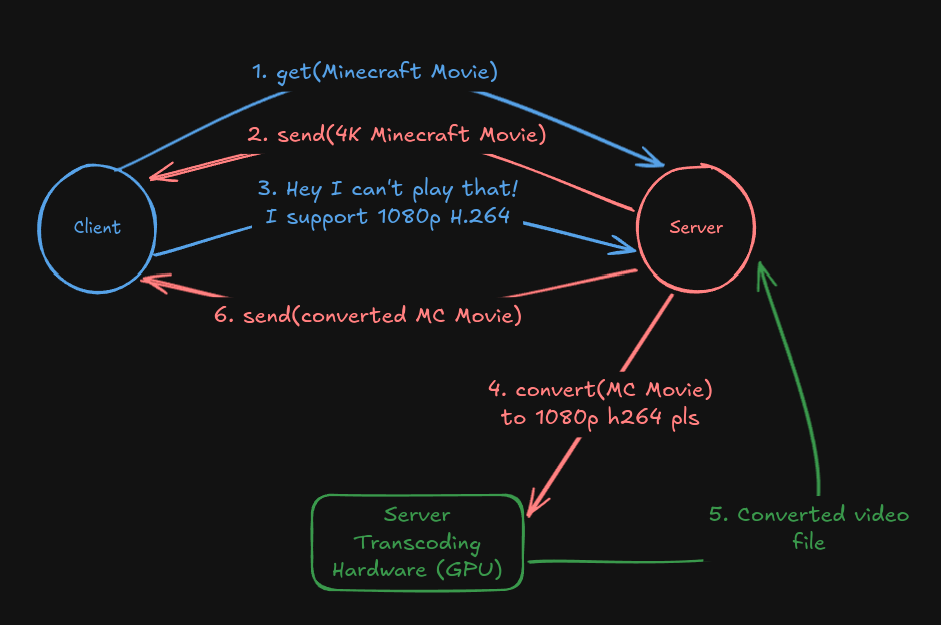
In my cluster, Jellyfin runs under a High-Availability Linux Container. I don't know where Jellyfin is running right now unless I check, but I know one thing. Not all my servers have a GPU. They may not even have integrated graphics! how do I transcode a media file, if the server where Jellyfin is running does not even have a GPU?
Distributed remote ffmpeg transcoding
This title sounds cool, because it is!
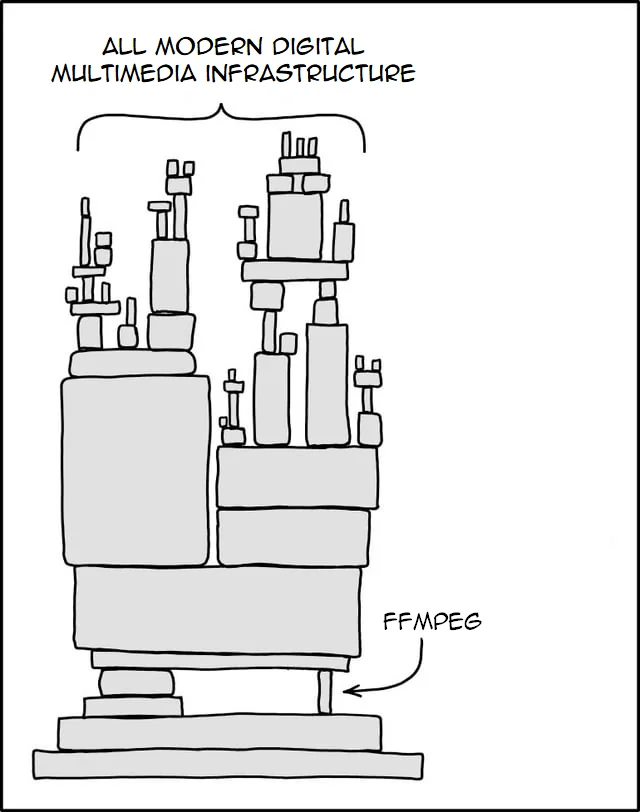
The solution is very simple, we will use the rffmpeg project (Remote ffmpeg). Now we have a server running Jellyfin and a few servers with GPUs that serve as "Transcoding Nodes". By using the rffmpeg project, this is what happens now:
Jellyfin calls locally the binary it thinks is ffmpeg, but actually we replaced it with rffmpeg (rffmpeg is acting as a ffmpeg wrapper). Under the hood, when rffmpeg is executed it searches for the least used transcoding node and opens a ssh connection to run ffmpeg on the remote server. It runs the same command Jellyfin intended to run, without modifying any flags.
Jellyfin still does the same operations, but internally it looks like this now that we added rffmpeg
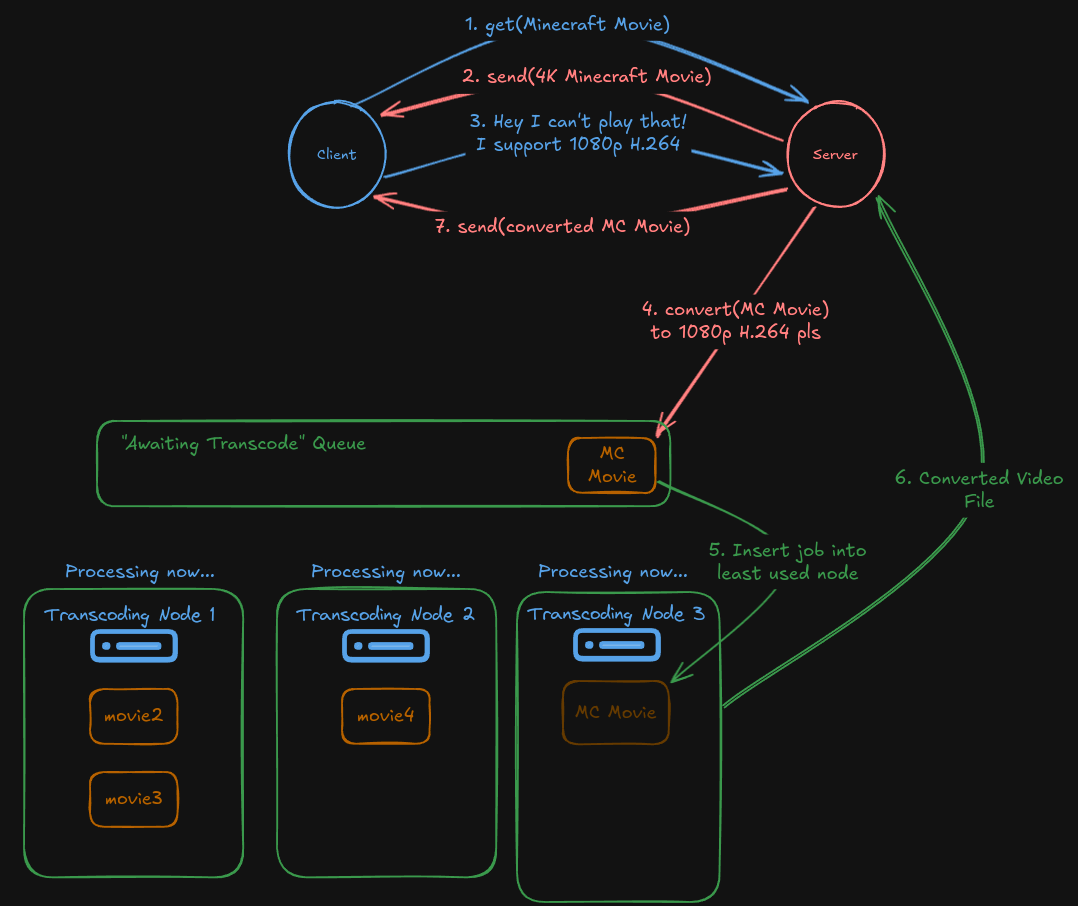
Since Jellyfin is the one that sends the ffmpeg command, it implies that Jellyfin must know what transcoding hardware is being used. Jellyfin is designed to run in a server that has a GPU locally, so it makes sense it should be the one that knows the hardware.
If Jellyfin asks for a transcoding job to be fulfilled by "Intel QuickSync Hardware" (it does this by adding certain Intel QuickSync-specific flags to the ffmpeg command) it can't be completed with a Nvidia card. The transcode will fail.
Limitation of remote ffmpeg: All transcode hardware must support the same 'protocol' and the same codecs
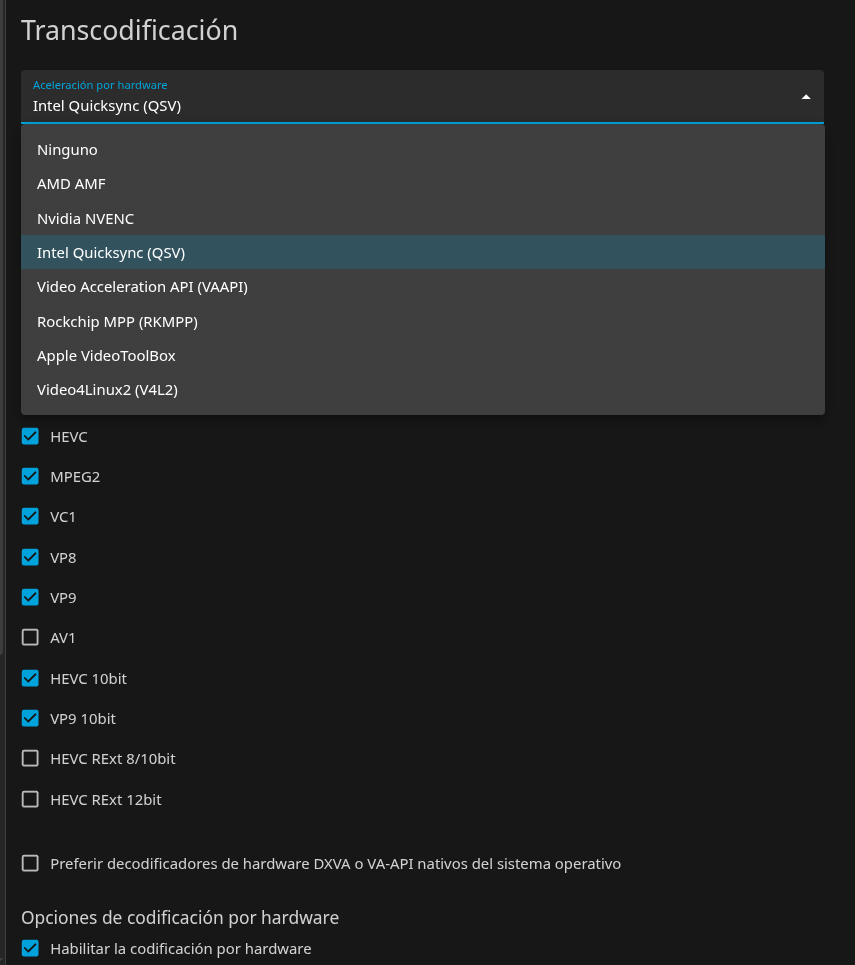
Sadly you can't mix Nvidia GPUs and Intel iGPUs in the same cluster. And you also shouldn't mix old technologies with new, like a RTX 5090 with a RTX 2080. The RTX 5090 supports newer codecs, like AV1, while the 2080 does not support it and will fail in transcoding. The RTX 2080 is old now, 7 years old!
To mix hardware, you have to alter the ffmpeg parameters that Jellyfin passes to rffmpeg; rffmpeg won't implement mixing hardware, it's out of scope for the project.
Can rffmpeg mangle/alter FFMPEG arguments?
Explicitly no. rffmpeg is not designed to interact with the arguments that the media server (Jellyfin) passes to ffmpeg/ffprobe at all, nor will it. This is an explicit design decision due to the massive complexity of FFmpeg. Source
That is all hardware transcoding in my cluster Wait a second. ffmpeg takes an input file and a output path. Where are transcoding nodes writing to? They can't write directly to Jellyfin's RAM... right?
That is true of course. With Jellyfin we are exposing a NFS network share for each transcoding node.
# /etc/exports

/var/lib/jellyfin 192.168.0.17/32(rw,async,no_subtree_check,no_root_squash,crossmnt)
/var/lib/jellyfin       192.168.0.21/32(rw,async,no_subtree_check,no_root_squash,crossmnt)
each transcoding node mounts /var/lib/jellyfin locally and write directly to Jellyfin's default transcoding directory /var/lib/jellyfin/transcodes
Do you see something strange in my NFS export parameters? why is there crossmnt?
Taking care of my SSD
Before MooseFS, even before I used Ceph 3~ years ago, I had a few SSDs and no income. Jump into 2025, I still don't have income but I have far more SSDs, of much higher quality than before.
Many years ago, I was using a consumer SSD in my Jellyfin node, as you may know, SSD memory cells have limited write endurance (TBW), write too much to a SSD and it breaks. Consumer SSDs are not intended to be writing all day, and my dear 240gb Kingston A400 drive knew that, so I wanted to take care of it 😄
/var/lib/jellyfin/transcodes is not mounted on the same filesystem (ext4) Jellyfin runs on. It's mounted as a tmpfs filesystem. tmpfs is literally writing to RAM, and is mounted by default on Linux systems in /tmp.
Transcoded movies are useless after they have been seen, so instead of wasting write cycles from my SSD, I simply write to RAM. I use a 14GB tmpfs partition, in my tests, for 5 concurrent users that was enough.
14GB is a small size, in the past Jellyfin tried to transcode the whole video in one go. this was not only inefficient (if the client stops watching the movie, you did a transcode for nothing) but sometimes 14GB was not enough memory to hold the entire transcoded movie. I didn't have more RAM, so I solved it with a cronjob
*/15 * * * * find /var/lib/jellyfin/transcodes/ -type f -name '.ts' -mmin +15 -exec rm -f {} +
What this cronjob does is similar to what Jellyfin does today since v10.10.7. My cronjob deletes chunks of transcoded video that is older than 15 minutes. Jellyfin nowadays can do the same, and also pause a transcoding job when it has transcoded enough (to not waste GPU energy in case the client abandons the video streaming). I recommend that you use Jellyfin's newer native version instead of my old cron patch
If a part that was transcoded is deleted, either by cronjob or jellyfin itself, it's because it was useless. In case we made a mistake (say, the user decided to watch the movie again), Jellyfin will ask again for that specific part we deleted to be transcoded again.
Why is there crossmnt in my NFS parameters? This is the reason, if that parameter isn't there, the transcoding nodes wouldn't be able to write correctly to the NFS share, because the transcode nodes run on a different filesystem (ext4). My setup with tmpfs is working fine, so why change something so efficient now 😉?
Now that distributed transcoding is covered, in Gamopelis we have modded a bit how Jellyfin works internally, for a better user experience for my friends and I.
Jellyfin Mods
Subtitle Synchronization during Transcoding
Jellyfin has a very old bug with subtitle synchronization if hardware transcoding is active. The issue about sub desync is open since Jan 23 2023 (older issues discussions have been moved to that one), still awaiting an official solution. For now, we need workarounds.
If you have not noticed from the introduction picture, I have 4 libraries.

One library holds Anime (with Japanese audio) and another holds movies in their Original Language (mostly English). The other two are Spanish Latino, my main language. We need subtitles, and if they are not in sync, they are useless. Bazarr, a software made for subtitle fetching and synchronization, is there to help with movies, but with Anime it's a different story that Bazarr does not cover, so we need a fix.
First we look at the problem. Hardware transcoding causes subtitles to be de-synchronized for some reason. The best solution to this problem is "enable burn-in subtitles during transcoding". Typically this is something each of your users must enable themselves, unless you edit Jellyfin-web configuration file to apply it globally to all your users 😄
Extracted from the Jellyfin Forum "Enable "Always Burn in Subtitle When Transcoding" by Default":
How to Enable "Always Burn-In Subtitles"
Go into your Jellyfin server. cd into /usr/share/jellyfin/web/. Take a backup of the file we are going to edit cp main.jellyfin.bundle.js main.jellyfin.bundle.js.bak just in case.
Search for the line that says something like AlwaysBurnInSubtitleWhenTranscoding=a.f.alwaysBurnInSubtitlesWhenTranscoding() and replace it with AlwaysBurnInSubtitleWhenTranscoding=true
Then find this code
{key:"alwaysBurnInSubtitleWhenTranscoding",value:function(e){return void 0!==e?this.set("alwaysBurnInSubtitleWhenTranscoding",e.toString()):(0,o.G4)(this.get("alwaysBurnInSubtitleWhenTranscoding"),!1)}}
and replace it with
{key:"alwaysBurnInSubtitleWhenTranscoding",value:function(e){return true}}
Restart your jellyfin server with systemctl restart jellyfin.service and done, subtitle burn-in is enabled during transcoding, to avoid de-synchronization from happening. Note: This file has to be updated whenever Jellyfin updates
Movie requesting and automated fulfillment inside Jellyfin
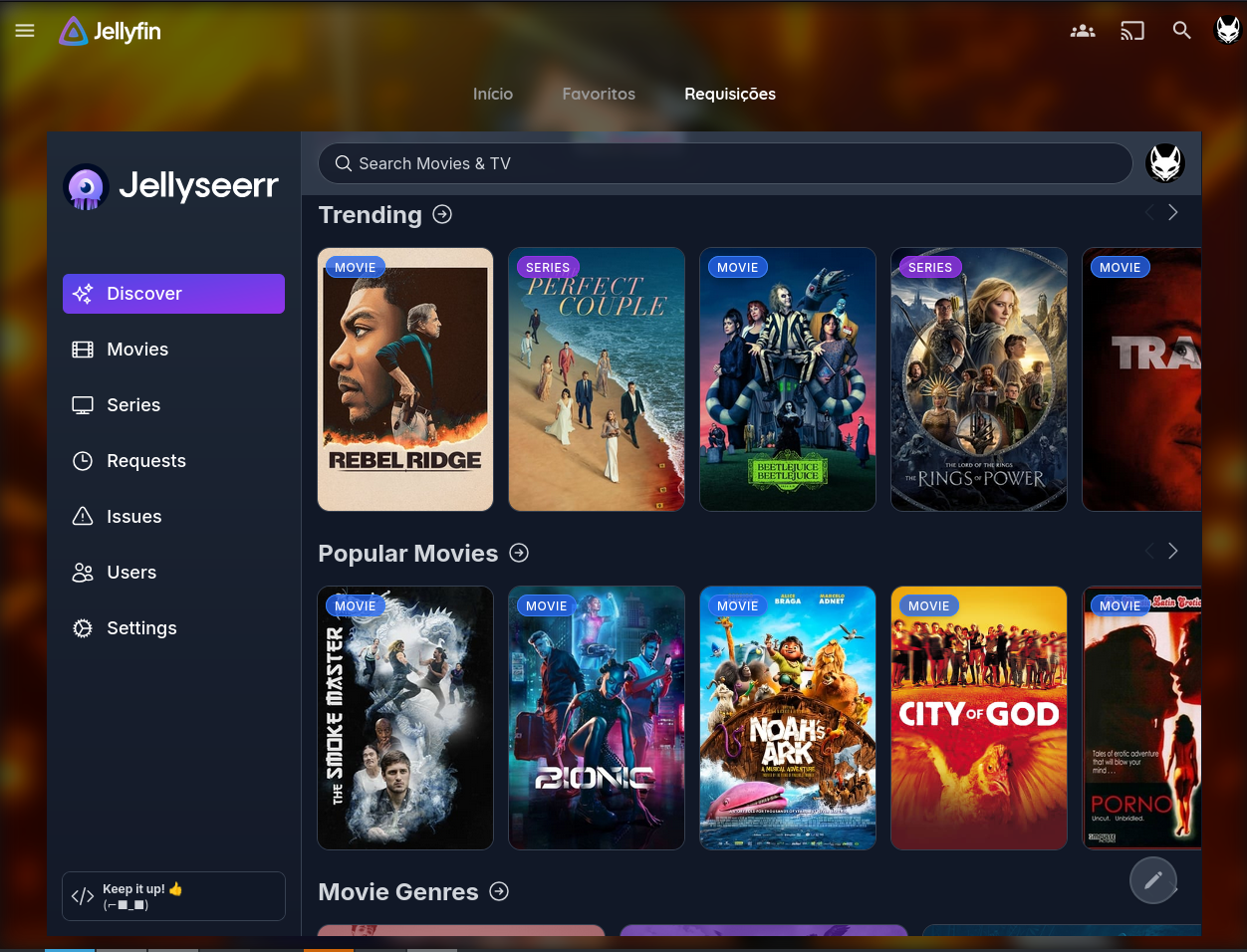
Jellyseerr, as seen in the picture, is another of the self-hosted services I run at home. Instead of users messaging me on Discord or Whatsapp, they look up anything, (Movies/TV Shows/Anime) on that website and click a 'Request' button. I enabled automatic fulfillment, so my server will automatically approve all requests, search for what they requested on internet, download it and, when it's ready, notify the users via email, all without my manual intervention. I don't care what my users want to watch, that's why I enabled automatic approval.
We have this jellyfin mod to access Jellyseerr from inside Jellyfin via a button, so users don't have to hop between two websites. This improves the user experience for them.
Jellyfin Plugins
Before users decided to strip down Jellyfin's internal javascript code, they added "Plugins". They are additions to Jellyfin that heavily improve the user experience. I can recommend two that are a must-have
- Intro Skipper: This should honestly be a native feature, it does exactly what it says. Not only skips intros, but can also skip outros/endings (sometimes in TV-shows the episode continues after the ending). A must-have if you watch shows.
- Fanart Plugin: Instead of the usual dull logo in the background of your shows, this plugin allows your server to fetch fan-created art of them automatically and display it on the background and while the show is loading. This is how it looks like on one of my shows:

And last, if you noticed, I'm not using the default Jellyfin theme. I'm using a custom theme. The CSS theme isn't mine! While I did try working on my custom CSS, I gave up and didn't want to reinvent the wheel. I'm using "Finimalism" made by Ted Hinklater. He recently updated his theme for the newest Jellyfin v10.11.X, which you can use in your server by going into Administration Panel -> Branding/Theme (Button under "General") -> paste this into the custom css box: @import url("https://cdn.jsdelivr.net/gh/tedhinklater/finimalism@latest/finimalism10.11.css"); (Original source by Ted)
Media content fetching
I am no longer that kid that downloads videos to a USB stick by hand, so we need automatic methods for a media server. Gamopelis runs 2 instances of Sonarr and 2 instances of Radarr.
- Radarr automates movie fetching and upgrades existing titles whenever a better quality is found.
- Sonarr does the same for TV shows ("Radarr" for shows).
Remember Jellyseerr? The service we use to receive requests from users? When a request is approved, Jellyseerr tells Radarr (if the request was a movie) or Sonarr (if the request was a tv-show/anime) "Hey! Search this and download it for me, tell me when you are done"
Wait wait wait. TWO instances of Radarr and Sonarr? Why not only one?
Each instance handles one library of my Jellyfin server. I have two libraries for Movies, one is dedicated to movies in their Original Language, which is much easier to find online, and the other is movies in Spanish Latino, which is harder to find.
Radarr applies the policy of "Quality Trumps All". It doesn't matter to Radarr if I already had a movie in 1080p with Spanish Latino like I wanted. If it found a movie in foreign language but with 16K resolution, Radarr will replace my spanish movie. This is why Radarr runs as two instances, one for Original Languages and one for exclusively Spanish Latino (If Spanish Latino is not included, the movie is rejected).
Sonarr runs as two instances for a similar reason, it's split in Anime and TV-Shows. TV-Shows must have Spanish Latino audio. Otherwise they are rejected. Anime must have Spanish subtitles and must have Japanese audio.
The rest of the automation pipeline (Prowlarr, Profilarr/Configarr, Qbittorrent, Huntarr, Checkrr, and others) handle indexers, quality profiles, downloads, and file integrity of the media files that are added to Jellyfin's libraries.
And that's everything for today! Hope you enjoyed reading this post about Gamopelis, if you have any questions about Jellyfin or my setup, let me know in the comments 😉