
bcachefs is all you need

I'm migrating away from MooseFS, the distributed filesystem software that used to power my entire >6 nodes Proxmox cluster. To bcachefs (local filesystem) + NFS on a single NAS computer.
Motivation is reducing power consumption. I'm reducing from 3 mixed storage-compute nodes to a single NAS node. Reducing average storage-related power consumption from idle 600 Watts (!) to only 130W idle. Hardware details of the new NAS will be on another future post, stay tuned!
What I'm looking on a new filesystem
We should look at what hardware I do already have, without going deep in details.
| Quantity | Interface Type | Drive Type | Capacity (Each) | Total Capacity |
| 4 | SATA | HDD | 4 TB | 16 TB |
| 8 | SAS | HDD | 3 TB | 24 TB |
| 9 | SAS3 | SSD | 4 TB | 36 TB |
| 3 | SAS3 | SSD | 3 TB | 9 TB |
| 1 | SAS3 | SSD | 7 TB | 7 TB |
| 3 | SATA | SSD | 1 TB | 3 TB |
| Totals | - | 12 HDDs / 16 SSDs | - | 40 TB (HDD) / 55 TB (SSD) |
As you can see on the list, there's a random amount of drives with not equal sizes ☹️. Casually we have near 1:1 ratio SSDs with HDDs which is really good.
I also added 2 Intel Optane M10 16GB for their low 6µs (0.006ms) read latency, but they are pretty much useless. More on why they are useless will be explained below.
Summing all up, we have around 90TB of mixed storage that we want to use in the most efficient way possible, since 55TB (60~%) of it is very expensive.
Expected use-case: Dropping everything in the same pool
Idea: ALL Proxmox Nodes will connect to the NFS share created by our future and unique NAS for "HA" deployment and dynamic load balancing between all nodes.
To simplify management, I want a single NFS-backed storage pool named "storageDC" for the cluster. Proxmox nodes do not need to know that the NAS has a mixture of HDDs and SSDs. It just needs to drop qcow2 or raw images in a pool and do "compute-work". Let the NAS do NAS things, like backups and deduplication.
NFS Tuning + setup
The setup for a distributed-local-filesystem is
1) Create a "Directory" storage type in Proxmox Cluster Manager. Set it as a shared directory across all nodes. Don't enable it yet. For example, name it "storageDC". it will be accessible on /mnt/pve/storageDC
2) Mount a bind mount in fstab in the NAS node from your local filesystem to storageDC, like this
/mnt/storage_bcachefs /mnt/pve/storageDC none bind 0 0
Install NFS-Server on the NAS node (the one that will be hosting the local filesystem to be exported to all nodes). In /etc/exports write:
/mnt/storage_bcachefs 192.168.0.0/19(rw,sync,no_subtree_check,no_root_squash,fsid=77)
fsid=77 prevents stale file handle errors for nfs clients that experience heavy network load
3) For all nfs clients (other proxmox nodes) add this to each one's fstab
nfs-storage-cluster:/mnt/storage_bcachefs /mnt/pve/storageDC nfs4 defaults,_netdev,x-systemd.automount,nconnect=16,noatime 0 0
replace "nfs-storage-cluster" with your NFS server's IP address
nconnect=16is basically free performance, it enables multiple TCP connections for a single NFS mount, a must-have for >10Gbit networks. source link
Choosing an appropriate NAS filesystem for uneven drives
I'm not going to use ZFS, since it does not support uneven drives (unless you do some NASty tricks with partitioning which is not desirable) (Update August/2026, ZFS releases ZFS AnyRaid, new technology which supports uneven drives within the same pool, but is still inflexible. You can't shrink a pool or remove drives permanently). mdadm is discarded by the same reason as ZFS, it does not support (natively) uneven drives.
Why did I discard BTRFS?
Upon exploring BTRFS, it does support uneven drives as I wanted, including compression and de-duplication with bees 🐝. BTRFS and ZFS are amongst the most reliable filesystems out there.
In their upstream documentation, as of 27 June 2026, they mention that RAID 5 and RAID 6 are still discouraged due to the write-hole issue. This issue means that, on an unsafe power loss while a write operation is running, there is a very small possibility of losing the entire data pool because of a bug in RAID56 implementation. Since 2023 there's ongoing work on Raid Stripe Tree, a new data structure which would definitely fix RAID56 write hole issues, but until then, we have to use other filesystems if we want something similar to raid56. You can check btrfs RAID56 status on this website. Flash storage is too expensive to lose 50% of it by resorting to BTRFS's RAID1-RAID10
Furthermore, I wanted to use both SSD+HDD in a single pool, but BTRFS and most other local filesystems don't distinguish between drive types, they don't implement any sort of "tiering" and would depend on two separate pools. MergerFS+SnapRaid comes close to some kind of hot-cold data tiering but Snapraid is not intended for virtual machines (LXCs).
Bcachefs as a do-it-all filesystem
Since last week, bcachefs is now finally considered "no longer experimental" by its developer for usage in production, this is great news!
Bcachefs is very similar, in features, to BTRFS, including up to 255 drives support. Bcachefs implements most of the features of Btrfs with a few more, like native encryption and defragmentation. Being a Copy-On-Write filesystem, it's very prone to fragmentation for heavy-write focused workloads, but their copygc internal mechanism periodically clears up the filesystem and defragments so performance stays optimal.
The features that we are interested in for our newest NAS setup are:
Multi-tier caching:
Remember that we have near 55TB of SSDs and 40TB of HDDs? bcachefs can use our SSDs as a "writeback cache" (this means write first to ssd pool and, in the background, write to hdd pool) and also keep frequently-read data in SSD devices (as long as we have each block device labelled correctly, as bcachefs will not detect the device type automatically).
Bcachefs uses labels to identify which device to place data on. For example, adding a device with bcachefs device add <pool> --label=hdd /dev/sda adds sda to a pool, and sda will have the label hdd. Labels can be changed in runtime by echo-ing any 16-char string to /sys/fs/bcachefs/<uuid>/dev-id/label and the filesystem will move data automatically.
Read-cached data is evicted from the Hot Data pool in a Least-Recently-Used basis whenever the SSD pool is getting close to 95~% full, unlike distributed systems like MooseFS which evict cached data based on time passed without being accessed.
Erasure coding
Since March 2026, bcachefs's erasure coding implementation is complete (only for data, not available for metadata). It supports up to 3 parity chunks, and the good part is that bcachefs dynamically (over-simplification) "chooses" the data chunks based on how many storage devices you have, allowing you to have the same storage efficiency as RAID5 (with one parity chunk) or RAID6 (with two parity chunks). Unlike traditional RAID, you don't have to rebuild the array when you add or remove a device.
Erasure coding in bcachefs is fundamentally a background process. If you are using multi-tier caching, this process strictly targets your Cold data tier (the --background_target parameter), but it does not require a multi-tier setup to function and works equally well on a flat storage pool.
To prevent the write-hole issue that BTRFS suffers from, bcachefs writes data initially in the foreground as standard full replicas. Later, a background thread groups these settled blocks into a new stripe, calculates and writes the full parity to disk, and finally deletes the extra initial replicas to free up space.
Testing with Intel Optane for metadata storage
bcachefs is known as a b+ tree filesystem, or a "database as a filesystem". The main trees are used for a metadata pool and a data pool.
As a rule of thumb, the max capacity of your metadata pool must be at least 1% of the total of your data pool.
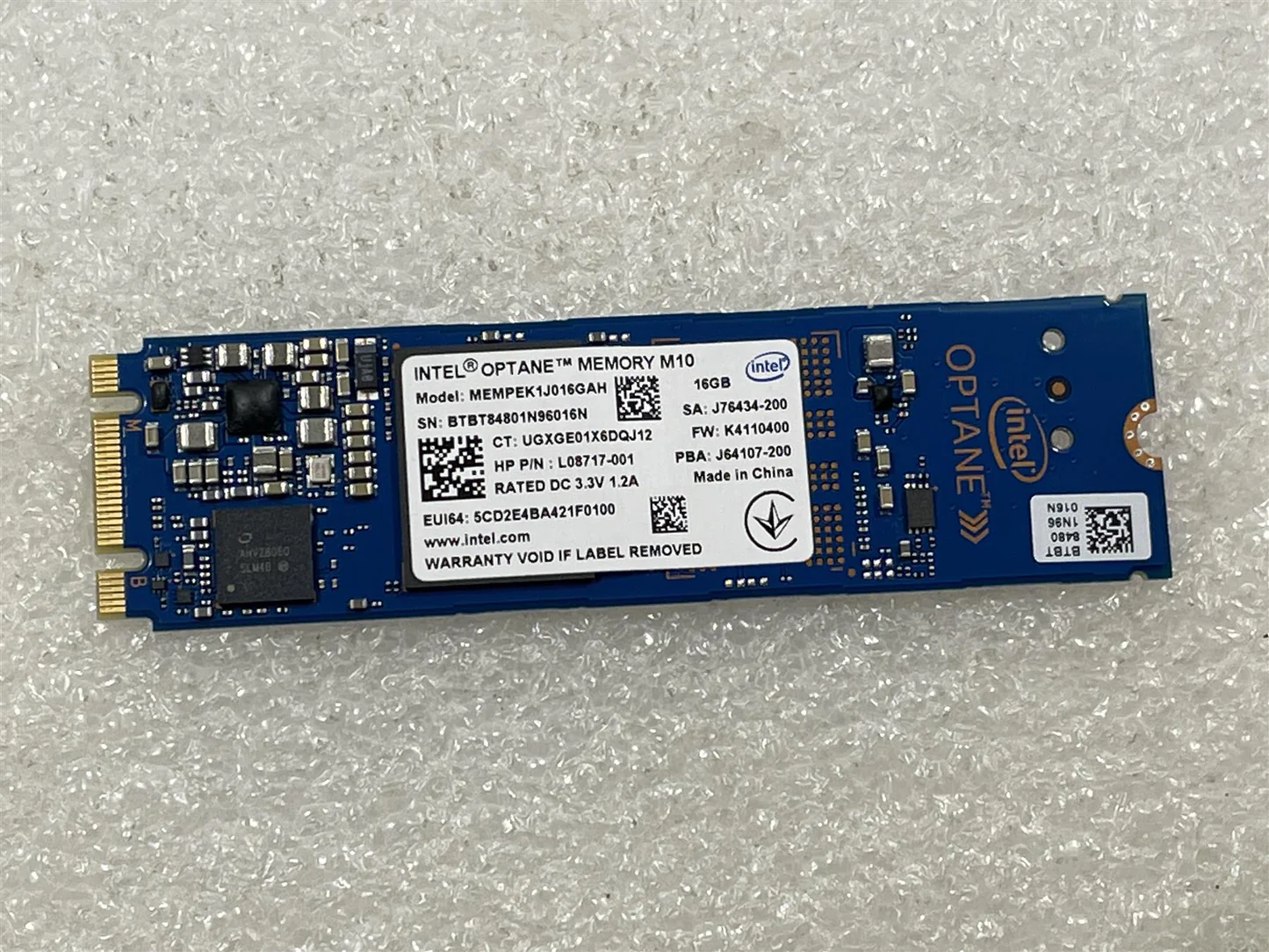
For bcachefs, Optanes seem like the best fit for metadata btrees. The M10 16gb has the write speed limited to 150MB/s in firmware because it was intended as a read cache by Intel. As advantages it has 200K Read IOPS, read latency of 6μs and costs under 10 dollars while having a massive 365 TBW durability for a 16gb drive.
In my setup initially I've installed two of them with --metadata_replicas=2 (RAID 1)
When the metadata pool fills up, metadata will overflow to --foreground_target data pool, in my case, my SSD pool. In my setup during migration, most of metadata resides in Optane drives, the rest is overflown to Samsung PM1633 SAS SSDs (which have a read latency of 30μs)
(im still adding drives, this is a peek at my filesystem)
root@gamohostlap:/mnt# bcachefs fs usage storage_bcachefs -h
Filesystem: eae5295d-ba33-4b23-832f-c25c75983e61
Size: 31.3T
Used: 17.9T
Online reserved: 192M
Replicated:
undegraded
1x: 4.36T
2x: 4.78T
3x: 70.1M
Erasure coded (data+parity):
undegraded
2+2: 94.6M
4+1: 5.28T
4+2: 168G
5+2: 128G
7+1: 307G
8+1: 383M
9+1: 2.91T
cached: 1.05T
reserved: 3.33G
Pending reconcile: data metadata
replicas: 28.3M 0
erasure_code: 2.85T 0
compression: 1.15T 0
target: 11.2T 9.17G
pending: 2.10T 0
Device label Device State Size Used Use% Leaving
hdd (device 8): sdl rw 2.71T 433G 15%
hdd (device 10): sdm rw 2.71T 394G 14%
hdd (device 12): sdn rw 3.62T 424G 11%
hdd (device 11): sdo rw 2.71T 383G 14%
hdd (device 7): sdq rw 2.71T 492G 18%
optane (device 6): nvme0n1 rw 13.3G 13.1G 99% 8.45M
optane (device 5): nvme1n1 rw 13.3G 13.1G 99% 8.92M
ssd (device 9): sdd rw 1.44T 1.41T 97% 1.24T
ssd (device 2): sde rw 3.48T 3.13T 93% 2.74T
ssd (device 3): sdf rw 3.26T 2.78T 92% 2.05T
ssd (device 4): sdg rw 6.97T 5.54T 88% 3.10T
ssd (device 1): sdh rw 3.48T 3.31T 96% 2.97T
ssd (device 0): sdj rw 887G 634G 81% 376G
I recognize this is a bit silly for a SSD pool. Please use at least Optane M10 64GB (skip 16gb and 32gb versions) or bigger PCIe based Optanes for metadata pools, or keep it simple and store metadata on SSDs. Since I had the 16GB Optanes from an older project, I have no other use for them.
Later I decided to reconfigure and set metadata_replicas=3 (3 copies), and set metadata_target=ssd. Metadata replicas was set to 3 for higher redundancy considering how many drives I have, and target was changed because only 2 optanes are not enough.
Then I've relabeled the optanes to ssd but with data_allowed=btree,journal so they don't waste TBW in holding data, only metadata.
Tuning for performance
I decided to add zramswap to my Proxmox server. I have 64GB of RAM in this server, but my boot drive (120gb Patriot Burst Elite SSD) is too slow for a swap file. I'm using the recommended sysctl parameters from the Arch wiki for zram but I'm using lz4 compression, because I need fast decompression. To preserve the heavy logging that bcachefs does, I also added log2ram including this patch for compressing the log2ram with zram (compressing with zstd, as I don't need to decompress often the log files).
My sysctl configs on the NAS are as follows:
vm.swappiness = 180
vm.watermark_boost_factor = 0
vm.watermark_scale_factor = 125
vm.page-cluster = 0
vm.min_free_kbytes = 524288

vm.dirty_background_bytes = 268435456
vm.dirty_bytes = 1073741824
vm.dirty_expire_centisecs = 1000

vm.compaction_proactiveness = 0
vm.extfrag_threshold = 100
vm.vfs_cache_pressure = 50
vm.dirty* settings are for reducing the writeback delay to the bcachefs filesystem.
The last three are for enforcing RAM usage for caching and reducing memory fragmentation. Until this bcachefs bug gets fixed, Transparent Hugepages have to be disabled with
echo never > /sys/kernel/mm/transparent_hugepage/enabled
echo never > /sys/kernel/mm/transparent_hugepage/defrag
echo 0 > /sys/kernel/mm/transparent_hugepage/khugepaged/defrag
Future plans
I've been missing online snapshots, since the MooseFS Proxmox plugin doesn't support snapshots reliably yet. So I will set-up automatic backups directly to a Proxmox Backup Server. If possible, I'll look on how to hook up bcachefs's snapshots implementation to Proxmox, so I can get O(1) snapshots.
The recovery process in case of a failing drive is very straightforward just like any other filesystem. I recently had to remove one of the HDDs, a WD Green, because it was too slow and old for a backing device. I only needed a bcachefs device evacuate and, after some time, a device remove and I was done.
The only issue is that, if a hard drive failure ever happens (in other words, if one of the drives of the bcachefs array is not present at boot-time), the system will not boot by default in degraded mode, you have to set the mount option degraded=run in fstab so it proceeds to mount in read-write mode if there's enough replicas.
So far I'm very happy with bcachefs 😄 If I had a mixed bag of HDDs and SSDs, I would 100% choose bcachefs again over a mixture of btrfs+mergerfs+snapraid like I did in the past.
But being a new filesystem, it still has its caveats. For example, it still does not have native rebalancing across devices, so you have to use a script like zfs-inplace-rebalancing (made for zfs but works for bcachefs).
That was everything for today, have a good day!