
Self-hosting Netbird with NPM and Zitadel

Netbird can be hard to self-host if you are not okay with the default installation script. I recommend for most of the steps you follow the official Netbird self-hosting documentation. I'll be pointing the stuff that isn't covered in the docs, specially for Nginx Proxy Manager.
Netbird is a P2P VPN service, in other words, it's a very cool wireguard wrapper with a very comfortable Web UI. Completely recommended.
I'll be focusing on Netbird and Nginx Proxy Manager setup. For installation instructions on Zitadel, I used the Proxmox VE Community Scripts to create a Zitadel container. I will not be covering in-depth setup of Zitadel.
Setting up a VM
I heavily recommend you use a virtual machine for a netbird server, as any quirk with Proxmox LXCs can be hard to debug.
I'm using a Ubuntu 25.10 VM with:
- 7GB disk (after setting everything up I still have 25% free space)
- 2 vCPU
- 2GB RAM as maximum, 256MB as minimum (ballooning).
All the netbird services must run under docker (consider installing docker!), and at this moment, it's actively using 384MB RAM.
I'll be using Proxmox's High Availability for my VM, so my disk will be stored in my MooseFS cluster and the VM's CPU type is "kvm64" for maximum compatibility.
If most of your servers have equal processors, consider setting CPU type to "host" for performance purposes.
Preparing your firewall
In your firewall, your Netbird VM must be reachable through the UDP 3478 port (STUN port). Also, open the ports 49152-65535 for dynamic TURN connections from Netbird peers.
The port 80 and 443 traffic are already covered by your Nginx Proxy Manager.
Preparing your keyboard

As guided in the step 1 of the self-hosting guide of netbird, begin filling your setup.env file. We'll be writing a lot of configuration files from now on, so be ready.
For some reason the Netbird guide wants you to set NETBIRD_MGMT_API_PORT and NETBIRD_SIGNAL_PORT to the same 443 port. This obviously won't work (two containers can't bind to the 443 port on the same machine), leave them blank, we'll configure them manually later 😄
We will be using NPM so set NETBIRD_DISABLE_LETSENCRYPT=true because we'll be handling SSL on the NPM side.
Configuring Zitadel
One thing to point out of the official instructions is to not forget to set the http://localhost:53000 as a redirect URL.
Since "localhost" is strictly http, Zitadel will complain that your redirect URL isn't secure (lol). You can either:
- Change Application Type from "User Agent" to "Native"
- Enable Redirect's Development Mode
Development mode, which is disabled by default, enables the use of HTTP as redirect URLs, as Zitadel is secure by default. I preferred to enable development mode.
After configuring everything, execute the configure.sh script. It will create the docker-compose file and many configuration files in /artifacts/, but it's not ready to deploy yet.
Zitadel and Nginx Proxy Manager
To access your Zitadel's authentication server with NPM, create a Proxy.
Enable all the common options:
- Cache assets
- Block common exploits
- Websockets support
Point your proxy with scheme "http" to your zitadel container on port 8080.
Then, in custom locations, add:
location / , forward hostname to your zitadel container on port 8080 with scheme http, but under Advanced configuration, add these grpc lines.
# Replace "zitadel.gamo" with your Zitadel IP/Hostname
grpc_pass grpc://zitadel.gamo:8080;
grpc_set_header Host $host;
grpc_set_header X-Forwarded-Proto https;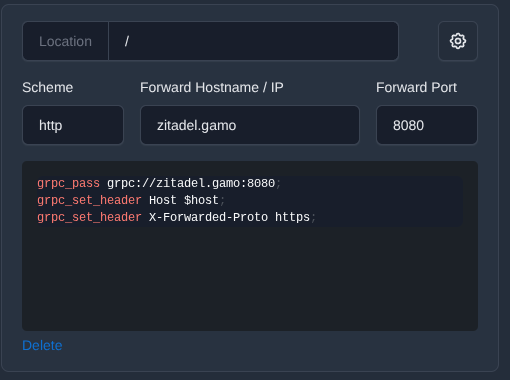
Add another location /ui/v2/login with the forward hostname identical and scheme http, but forward port 3000.
Under SSL, as always, Force SSL and enable HTTP/2 support.
Setting up Nginx Proxy Manager for Netbird
This was the hardest thing to figure out.
For reference, my Netbird server VM hostname is netbird-server.gamo
Under NPM, create a New Proxy. Mine looks like this
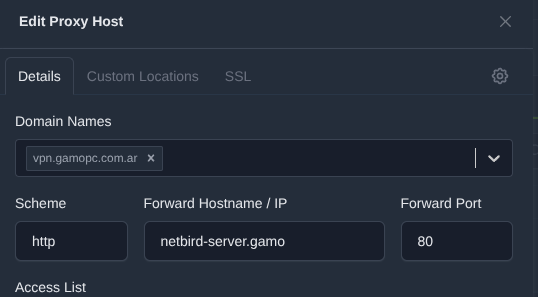
Enable Websockets Support, and optionally Cache Assets. Under SSL, force SSL and enable HTTP/2 support.
In advanced configuration for the entire proxy, add
proxy_set_header        X-Real-IP $remote_addr;
proxy_set_header        X-Forwarded-For $proxy_add_x_forwarded_for;
proxy_set_header        X-Scheme $scheme;
proxy_set_header        X-Forwarded-Proto https;
proxy_set_header        X-Forwarded-Host $host;
grpc_set_header         X-Forwarded-For $proxy_add_x_forwarded_for;
underscores_in_headers on;

client_header_timeout 1d;
client_body_timeout 1d;
Custom locations on NPM
Assuming that you left NETBIRD_MGMT_API_PORT empty, your Management port would be by default 33073, and if you left NETBIRD_SIGNAL_PORT empty, the default port for the Signal service is 10000
The grpc proxy configurations were obtained from open/merged PRs and issues like these on the Netbird's github repository.
Signal locations
/signalexchange.SignalExchange/ on scheme http and port 10000
Under Advanced settings for this specific location, paste
    if ($http_content_type = "application/grpc") {
        grpc_pass grpc://netbird-server.gamo:10000;
    }
grpc_read_timeout 1d;
grpc_send_timeout 1d;
grpc_socket_keepalive on;
grpc_set_header         X-Forwarded-For     $proxy_add_x_forwarded_for; #helps getting the correct IP through npm to the server
Replace "netbird-server.gamo" with the hostname/IP of your netbird VM
/ws-proxy/signal on scheme http, forward host to your netbird VM on port 10000
Management locations
/api on scheme http, forward host to Netbird VM on port 33073
/management.ManagementService/ on scheme http and port 33073. Under advanced configuration for this location, add
    if ($http_content_type = "application/grpc") {
        grpc_pass grpc://netbird-server.gamo:33073;
    }
grpc_set_header TE "trailers";
grpc_set_header Host $host;
    grpc_set_header X-Real-IP $remote_addr;
    grpc_set_header X-Forwarded-For $proxy_add_x_forwarded_for;
    grpc_set_header X-Forwarded-Proto https;

grpc_read_timeout 1d;
grpc_send_timeout 1d;
grpc_socket_keepalive on;
grpc_set_header         X-Forwarded-For     $proxy_add_x_forwarded_for; #helps getting the correct IP through npm to the server
/ws-proxy/management on scheme http and port 33073
Other locations
/relay/ on scheme http and port 33080
Configuring Netbird stack
If you haven't noticed, the guide wants you to execute the configure.sh and call it a day, but it isn't enough if you are using your own Identity Provider and NPM.
In your Netbird's ssh console, go to /netbird/infrastructure_files/artifacts and edit management.json
Relay settings
Find the Relay addresses, you may find something like rels://example.com:33080/relay. Change it to rels://example.com:443. Example:
    "Relay": {
        "Addresses": [
            "rels://vpn.gamopc.com.ar:443"
        ],
        "CredentialsTTL": "24h0m0s",
        "Secret": "censored"
    },
Signal settings
Find the Signal settings section, make it look like this.
    "Signal": {
        "Proto": "https",
        "URI": "vpn.gamopc.com.ar:443",
        "Username": "",
        "Password": ""
    },
Make sure the "URI" matches your domain name along with the 443 port.
CHANGE THE "Proto" value from "http" to "https"
Modding the docker-compose.yml
We are almost finished!
Open the docker-compose.yml with your favorite editor and, in the relay container options, yours may look like my commented NB_EXPOSED_ADDRESS. Modify it like this.
  relay:
    <<: *default
    image: netbirdio/relay:latest
    environment:
    - NB_LOG_LEVEL=info
    - NB_LISTEN_ADDRESS=:33080
    #- NB_EXPOSED_ADDRESS=rels://vpn.gamopc.com.ar:33080/relay
    - NB_EXPOSED_ADDRESS=vpn.gamopc.com.ar:443
You've been waiting for this
Run docker compose up -d
If you accidentally started the stack before changing your configurations, do docker compose down -v to wipe your docker volumes and up 'em again.
You will be guided on Netbird's setup when you log-in through your netbird URL.
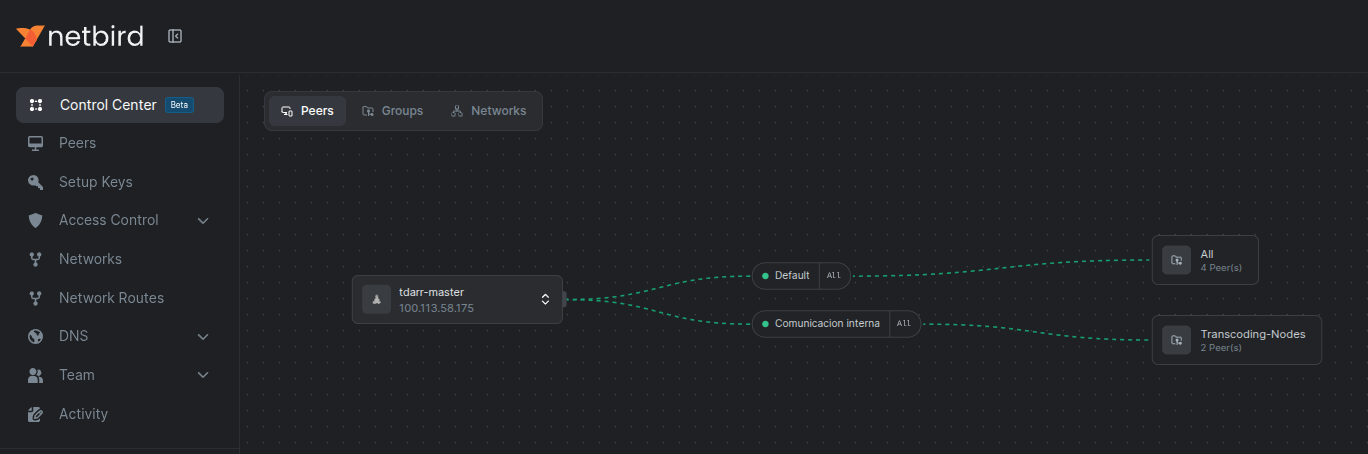
Little note: I'm NOT proxying my VPN subdomain through Cloudflare Proxy, and I don't recommend you do.
And that's it! Enjoy Netbird with all your devices. I'm still working on how to get it to work with the Android client, as I can't authenticate with Zitadel because it redirects me to localhost 🤔...
Have a good day!