
Why I moved from Ceph to MooseFS


Today we are discussing why MooseFS is the filesystem I will use now in my personal cluster. Why I am moving from Ceph after almost 3 years of experience, and why should you!
In my research of Distributed Filesystems, I found multiple options, like SaunaFS, MooseFS, Ceph, Vitastor, etc. My requirements were only a few, I'll list them and quickly explain them so we are on topic
- Erasure Coding
- Free (0$)
- Resource efficient
- Fast
Erasure Coding vs Replication
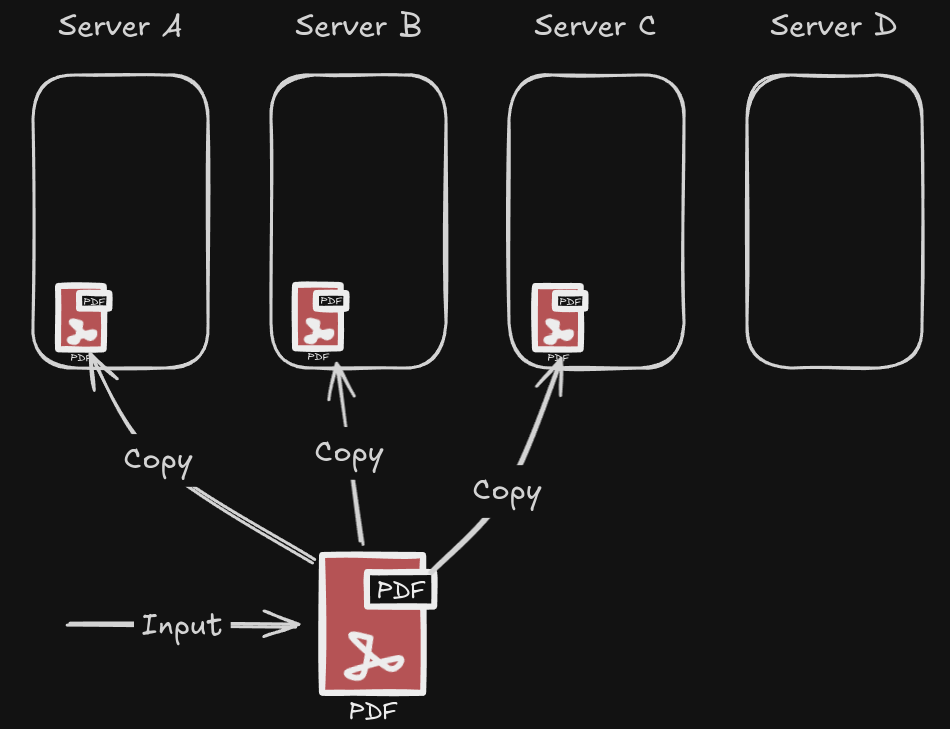
I wanted Erasure Coding as a parity option instead of simple replication. All distributed filesystem implement the replication method for redundancy. It's as simple as having multiple copies of the same data on different servers. If replica=3, you now have 3 copies of the same data on 3 different servers. While this is "easy" to implement, it's also the most expensive redundancy method. By making 3 copies of the same data your usable storage cuts to 1/3 of the sum of all your hard drives.
If your data is very important this is one of the safest methods to use. Mine is important, but not important enough to justify 3 copies.
Fun fact: Note that replica=3 states a requirement of minimum copies. At any point in time, your distributed filesystem can create MORE copies than what you asked 😄. For example, take the image I added above. if server A went down, you now have 2 stable copies (one on server B and C). Your distributed filesystem should re-create the missing third copy on server D to comply with replica=3 requirements. If server A comes online again, you now have 4 copies, one in each server. Normally the filesystem detects the extra copy and:
- Will delete the extra copy as soon as possible (Behaviour in MooseFS)
- Will delete the extra copy during scheduled filesystem scrubbing (Behaviour in Ceph), not immediately.
Now that replication is covered, enter Erasure Coding (for short, "EC"). I'll give a very short explanation of EC that helps in understand why I prefer EC.
EC splits files in n chunks. Where n = k + m. Those k and m are up to the administrator to configure 😃.
- The "k" parameter means "data chunks"
- The "m" parameter means "parity chunks"
Let's take for example the PDF file we have shown in the replica=3 example. If we choose k = 4 and m = 2, that means our pdf will be split into 6 (4+2) chunks at the filesystem level. For the pdf file to exist in all its integrity, it needs 4 data chunks. The other two are simply parity. If we lose 2 servers, our pdf can still survive with the remaining 4 chunks. Lose a third server and your files are gone. The benefits of EC are very clear, thinking in terms of n = k + m, you only need k chunks to survive.
The storage efficiency for any file in a filesytem configured with Erasure Coding is calculated by the formula k/(k+m), for the k=4 m=2 example, 4/6 = 66.6%. For replica=3, it's 1/3 (33% efficiency).
There is an obvious increase in storage efficiency, but EC comes at a cost. While in a replica=3 setup, any of the 3 copies are equal (so reading any of the 3 copies is fine to obtain a file), in erasure coding you need all the chunks to compose a file and work with it. That means, I need to request to k different servers to obtain a file, always.
It's clear that EC comes with a performance hit both on reads and writes compared to replication, but the tradeoff with storage efficiency makes it very worth it. I'll be choosing erasure coding mainly for the storage efficiency over performance.
Speed: Why is Ceph so slow?
I want a fast distributed filesystem. Why Ceph, the most popular open source filesystem, is so slow? Ceph is known for its reliability. I do agree, I've been brutal with my servers, and Ceph stood up like a champion. But being this resilient doesn't come free.
For context. I'm running a 5 node all-enterprise-SSD cluster with 10Gbit dedicated networking (which I'll talk further in another post!), you can say anything about that my cluster isn't big enough, but a software shouldn't be slow simply because "it needs more money nodes". The software is slow for many reasons, and it's because of how good it is at safety.
The CRUSH algorithm
Classic designs like Google File System (GFS), MooseFS, and LizardFS use a master/metadata server. Clients (your laptop, for example) ask a single master, “Where’s my PDF?” The master replies with the locations, and the client then talks directly to the chunk/data servers. The master also coordinates replication and rebalancing, but I/O doesn’t flow through it.
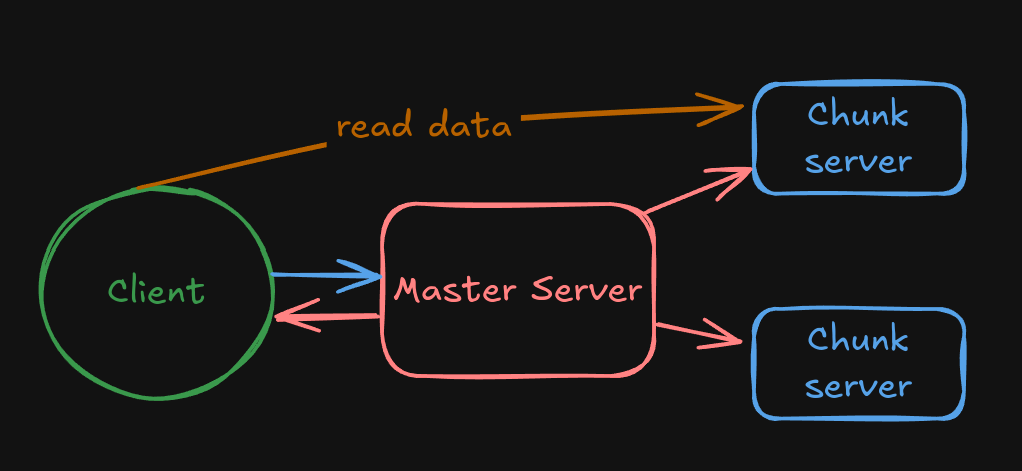
A single master is very efficient for a number of reasons but creates a single point of failure. If the master fails, your cluster fails. It has a scalability ceiling compared to Ceph's approach, as MooseFS runs as a single process on a single server, meaning that your cluster's metadata is limited to work on one CPU.
Ceph solved this very easily. The CRUSH algorithm. With a simple CPU-bound calculation, Instead of asking a master, clients and servers compute where data lives using a deterministic, hierarchical mapping (the CRUSH map). That removes the central lookup bottleneck and lets the cluster rebalance without a master directing every move. They solved the single-master-server problem! But it came at a tiny, little cost. This math algorithm introduces a CPU overhead and, overall, adds latency to ALL operations, read() and write().
Not only that, but writing to a Ceph cluster is completely synchronous by default. The client doesn't receive a "write completed" response until the data has been fully safely replicated. In a replica=3 ceph pool, your client's writes are not exactly completed until ALL 3 copies exist in the cluster. This makes Ceph very safe, but slows down write speed.
The upside is that throughput stays predictable and scales for lots of clients, even under failure, which is exactly what Ceph optimizes for.
Now you know why exactly Ceph is so slow! But words are not enough to magnify how much of a problem this is. I no longer run Ceph to show you proper benchmarks with numbers, but I still have this picture from my Grafana dashboard from when I was migrating.
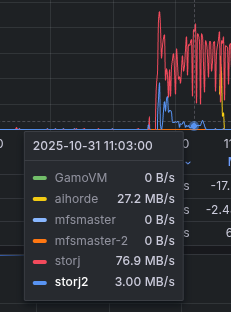
Storj and Storj2 were two VMs running the Storj project. Storj1 was running the new MooseFS setup with replica=2. Storj2 And aihorde were still on a Ceph all-flash erasure coding pool with k=2 m=1. while I do agree that Ceph's erasure coding is known to be slow, this is absurd. You can see in the Grafana graph that the blue lines are not even close to MooseFS's speed.
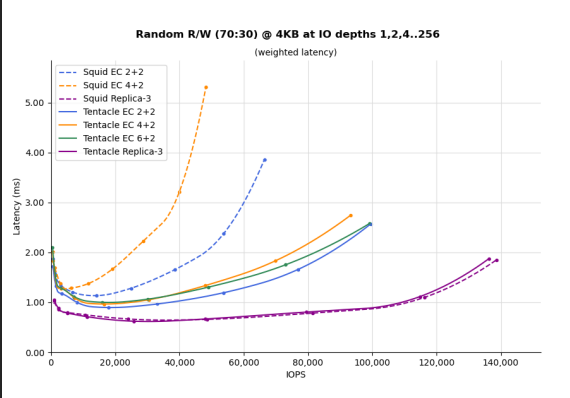
Good thing about Ceph is that their EC story is changing in the future for the better. Ceph Tentacle -their future version- comes with performance improvements to Erasure Coding and may release later this year 2025 😄
Resource efficiency
I'm not a Ceph hater and at this point sounds like I am 😛
This point was the most important of them all, this is the main reason that I had to leave Ceph, my cluster was running into OOMs very frequently.
For context, in Ceph each drive (called 'Object Storage Device', OSD for short) requires to run under a ceph process. This OSD process requires as a minimum 4GB of RAM for normal operation.
So if you are running 8 drives in a single server, that adds up to only 8x4gb=32GB RAM dedicated exclusively to Ceph.
Unfortunately, money doesn't grow on trees. When one of my nodes started running into OOM issues, I simply couldn't afford another RAM stick to patch the problem. I decided that Ceph was consuming too many resources regarding the benefits, and I wanted my RAM back, so I started looking into alternatives.
Also, those "OSDs" I mentioned earlier? I did mention a minimum of 4GB ram! Did you know that you should also account for ram spikes? According to the Ceph docs and my own experience, a OSD can use up to 8GB RAM EACH. Let me do the math again with 8 drives, that's up to 64GB RAM spent on Ceph on a single node! You can technically run Ceph by only provisioning the bare minimum memory and relying on a swap partition, but the performance tanks due to constant swapping.
The alternatives
To clarify, this 5-nodes Proxmox cluster is composed mostly of:
- 10~ Samsung PM1633a 4TB SSDs
- 1 Samsung PA33N7T6 7TB SSD
- 3 Huawei HSSD 3TB
- 1 Kingston DC400M 480GB
- 5~ Samsung PM883 1TB
- 10 Hitachi Ultrastar 4TB HDDs (soon to be swapped!)
All of those drives have PLP (Power Loss Protection) included and enabled as strictly required for data integrity in Ceph and any distributed filesystem.
For networking, we are using Intel X540-T2 10Gbit network cards
Ceph, In my experience, is slow and uses too much memory resources. These are all the alternatives I found worth mentioning here.
- Linstor: Discarded, doesn't support Erasure Coding
- Vitastor: I did test Vitastor with a test cluster. I loved it. It is a re-implementation of Ceph and fixes most of the stuff that I needed. It's faster and uses half the resources than Ceph, while still keeping the core concepts like OSDs. I decided to not continue on it for only one reason, it's the personal project of a single developer. While I do not know this developer and I think he's doing a great job by working on it, if any problem arise or if I find any bug, I don't want to depend my entire cluster on one passionate developer.
- SaunaFS: It's the continuation of the now defunct LizardFS. Since they don't provide Debian binaries, I couldn't compile the project on Debian to try it out at the time. Just like LizardFS,
SaunaFS is intended to be an open source alternative to MooseFS, so I didn't bother to keep trying to test it.It's not an alternative to MooseFS, edited in 26-02-25
And now, the main topic of this post. MooseFS
Why specifically MooseFS?
Problems
Not everything is 100% great. MooseFS comes with disadvantages, and it isn't technically 100% free.
- It uses the Master – Chunkservers system. All metadata of the entire cluster runs in the master server in RAM, making it super fast, but also volatile. If this master server fails, your entire cluster will fall. Running non-ECC RAM for the master puts you at a higher risk of data corruption.
- The erasure coding profiles are only two and not freely configurable by the administrator. (Remember the k parameters for erasure coding 'chunks'?) You either get to pick
k = 4ork = 8. Themparameter is, as a minimum,m=1. - Erasure coding profiles are only allowed for cold data, not hot data.
MooseFS has both a Community version and a Professional version ($), the Pro version solves the first 2 problems.
The Pro version comes with built-in High Availability for the Master Server. It also allows you to freely set the m parameter for erasure coding, from m=1 up to m=9 (still, the k parameter is forced to either k=4 or k=8). With the Community version you are forced to m=1.
The first problem can be solved by yourself in the Community version by rolling your own HA system, the EC m=1 problem can't be avoided as it's hardcoded in the Community version.
MooseFS allows to store your data in a kind of "hot/cold" system. Hot data pool and Cold data pool.
Hot data is stored strictly in replica=N mode (where N can be freely set by You, the Admin. Like replica=3). When hot data goes unused for an X amount of time, it goes to cold storage. you can allow MooseFS to store cold data in HDD storage under a erasure coding profile.
Advantages
CPU usage: Since it lacks a CRUSH algorithm, the CPU overhead is much less in these kind of filesystems.
Master – chunkserver systems run a master as we already mentioned and chunkservers. The chunkservers serve for storing 'chunks' (data) and serving them to clients. A chunkserver by default should handle all the disks in a server.
As you may have noticed, if I wanted erasure coding and I'm locked to a profile like k=4 m=1, I should be able to achieve this if I'm running 5 nodes. But MooseFS for security wants n+1 servers for this parity profile to work, that means, instead of 5, I would need 6 servers. I only have 5 servers, so I need a patch.
My solution is running, for each drive in a server, one separate chunkserver process. This is a bit more inefficient in terms of memory usage, but not that much.
At a minimum each chunkserver uses 500MB of memory, that is 3500MB less than Ceph. In my case, each chunkserver is using around 2GB memory each.
root@gamohost2:~# systemctl status mfschunkserver4
     Memory: 2.2G (peak: 3.3G, swap: 716K, swap peak: 716K)
/etc/mfs/config_ssds/mfschunkserver-ssd4.cfg start
```
Lets see some benchmarks!
Write speeds
Since writes are not fully synchronous in MooseFS, this comes at both an advantage and disadvantage. The first advantage is very clear, writes return as soon as one copy exist in the cluster. The other copy gets later created by the chunkserver without involving the client. This comes at a disadvantage, if the first and only copy is corrupt (for example, server crashes, drive is failing or server is unsafely shutdown during a write) replicating a corrupt copy doesn't matter, the file is lost. This makes MooseFS less secure than it's most popular competitor, Ceph.
Non-synchronous writes is an ongoing design problem since 2018, it has been mentioned in these issues in the MooseFS github repository and have not been solved yet as of 2025-11-10, so MooseFS doesn't offer fully synchronous writes yet.
- "Force FSYNC" Issue #115 (2018)
- "Replication may not always be safe" Issue #715 (2025)
Let's see some numbers! We are running fio commands directly on one of the servers of the Proxmox cluster. The commands will be shortened for clarity
root@gamohost2:/mnt/pve/gamofs/temporal# sudo fio --name=write_throughput --directory=/mnt/pve/gamofs/temporal/ --numjobs=8 \
--size=10G --time_based --runtime=60s --ramp_time=2s --ioengine=libaio \
--direct=1 --verify=0 --bs=1M --iodepth=64 --rw=write \
--group_reporting=1

  write: IOPS=1111, BW=1120MiB/s (1175MB/s)(65.8GiB/60159msec)
```
1120MB/s of write throughput. That is near the limit of my 10Gbit networking, impressive!
For write IOPS:
root@gamohost2:/mnt/pve/gamofs/temporal# sudo fio --name=write_iops --directory=/mnt/pve/gamofs/temporal/ --size=10G \
--time_based --runtime=60s --ramp_time=2s --ioengine=libaio --direct=1 \
--verify=0 --bs=4K --iodepth=64 --rw=randwrite --group_reporting=1
write_iops: (g=0): rw=randwrite, bs=(R) 4096B-4096B, (W) 4096B-4096B, (T) 4096B-4096B, ioengine=libaio, iodepth=64

  write: IOPS=19.4k, BW=75.7MiB/s (79.3MB/s)(4540MiB/60001msec); 0 zone resets
```
19.4k write IOPS directly to the cluster
Read speeds
Quick reminder about the master – chunkserver structure. The client asks the master "hey, where is my file?" . The master searches it up in its metadata log, which is stored in memory, and returns "hey client, ask these chunkservers for your file". Because of this, in theory read speeds will most likely be capped at the networking speed limit, just like writes. In other words, the speed will be limited by the client's connection to the chunkserver.
root@gamohost2:/mnt/pve/gamofs/temporal#
sudo fio --name=read_throughput --directory=/mnt/pve/gamofs/temporal/ --numjobs=8 \
--size=10G --time_based --runtime=60s --ramp_time=2s --ioengine=libaio \
--direct=1 --verify=0 --bs=1M --iodepth=64 --rw=read \
--group_reporting=1
Run status group 0 (all jobs):
   READ: bw=536MiB/s (562MB/s), 536MiB/s-536MiB/s (562MB/s-562MB/s), io=31.4GiB (33.7GB)
```
530MiB/s?!
This was a bit unexpected, we got 530MiB/s. That is half the write speed, but is still very good. Those reads come directly from the replica=2 SSD pool. What is going on?
Why?
After investigating, it turns out my SSD pool (hot data storage pool) was full!
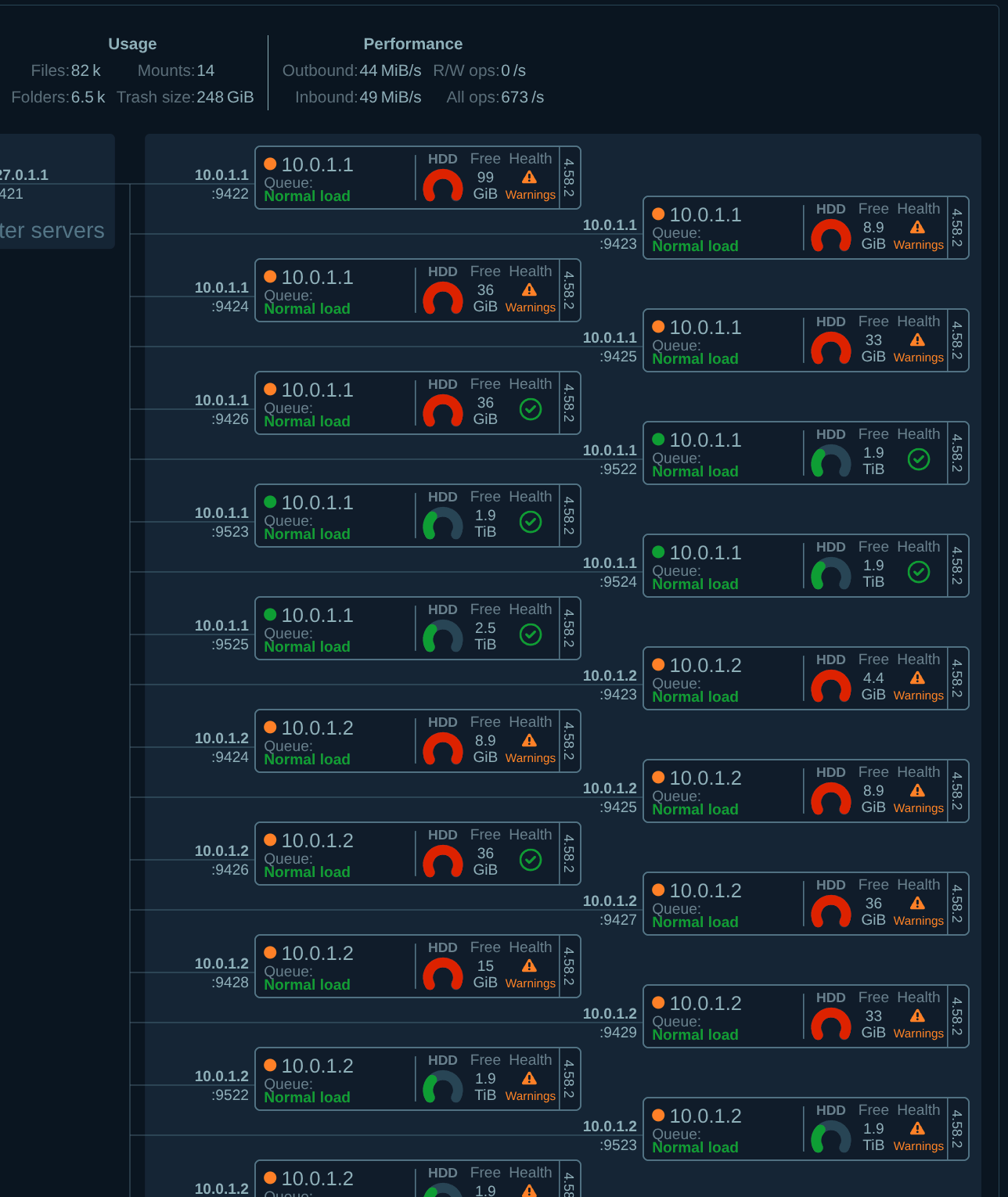
What happened: The temporal files that fio creates for read tests were overflowing to the HDD pool. Why exactly? MooseFS has 3 configurations for a hot and cold storage setup. By default, if the hot data pool gets full, data will overflow to different pools (in my case, the cold storage pool, which was composed of HDDs). As soon as the hot data pool gets more space, data gets moved accordingly to the correct pool.
If you wanted to be more strict, you can set a configuration flag in MooseFS to not allow any more writes if the hot data pool is full. What was happening here was simple. Half of fio's test data was stored in the hot pool, and the other half was overflowing to the HDD pool. We were reading from both, causing a massive slowdown in read speeds.
After freeing up some space from the hot storage pool, we got these results in read throughput.
root@gamohost2:/mnt/pve/gamofs/temporal# sudo fio --name=read_throughput --directory=/mnt/pve/gamofs/temporal/ --numjobs=8 --size=10G --time_based --runtime=60s --ramp_time=2s --ioengine=libaio --direct=1 --verify=0 --bs=1M --iodepth=64 --rw=read --group_reporting=1
  read: IOPS=1355, BW=1364MiB/s (1430MB/s)(79.9GiB/60032msec)
Just as we expected, around the 10Gbit line as max read throughput
We got 1364MiB/s read speed, which is a bit over 10Gbit/s. This happens because the server gamohost2 we ran the command on, is running a few chunkservers in the background, so if a part of the data we needed is available locally we don't need to hop over the 10gbit network to fetch it, that's why the speed is a bit higher than 10Gbit/s. Some parts of the data were available locally.
For Read IOPS, we did a read IOPS fio test by performing random reads, using an I/O block size of 4 KB and an I/O depth of at least 64:
root@gamohost2:/mnt/pve/gamofs/temporal# sudo fio --name=read_iops --directory=/mnt/pve/gamofs/temporal/ --size=10G \
--time_based --runtime=60s --ramp_time=2s --ioengine=libaio --direct=1 \
--verify=0 --bs=4K --iodepth=64 --rw=randread --group_reporting=1

Jobs: 1 (f=1): [r(1)][100.0%][r=98.7MiB/s][r=25.3k IOPS][eta 00m:00s]
  read: IOPS=23.5k, BW=91.8MiB/s (96.3MB/s)(5508MiB/60001msec)
around 25k read IOPS, which is very good for a distributed filesystem of this scale!
I hope those numbers can help you in making a decision. I mentioned most of what makes MooseFS a good file system and a better option than other distributed filesystems.
Conclusion: what should I pick?
If you are willing to use the safest and most reliable filesystem, Ceph is the way to go. While I did mention a lot of negatives about Ceph, I can't deny how reliable it is. I had random power offs, thunderstorms, a flood and cyclones in my city, and I had no data loss ever. Ceph handles faulty drives by itself and disconnects them from the cluster whenever they are not reliable, without admin intervention.
As we mentioned earlier, MooseFS lacks fully synchronous writes and the Community version lacks HA for the master server. You have to set up HA yourself, and there's nothing you can do (yet) about random power offs. In a enterprise environment, one usually has redundant everything (redundant power supplies, switches, etc), at home, I don't, so I'm more at risk of hardware failures. If you want a more efficient use of resources (RAM) and better speed overall, MooseFS is what you should pick.
For the much faster speed over other filesystems, I would pick MooseFS again without a doubt 😄
And you? Will you migrate to MooseFS?